Tabs are used for organizing information by showing one section while hiding other related sections at the same time.
Usage
Tabs are either oriented horizontally or vertically.
Vertical tabs on a case represent sections of critical data, relevant discussions, unique views of data, or fundamentally linked case relationships such as child cases and dependencies. Additionally, they may also show key bits of metadata around the internal content if desired, such as counts of items or key performance indicators.
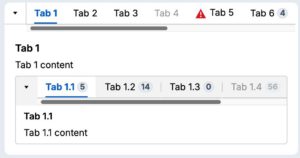
Avoid nesting tabs whenever possible.
Limit the number of tabs to seven or less to avoid information overload.
Display options
Count
Tabs may also contain a count badge if provided with a number.
Content guidelines
Ensure tab names are sentence cased instead of title cased. For example, name a tab “Risk analysis” instead of “Risk Analysis”.
Configuration
To learn how to configure this component in a Pega application, visit Pega Documentation.
All information on this site is for Pega’s UX design system, also known as Constellation (from 8.8 and onwards). If you have questions, concerns, or any other feedback, please reach out to us on Pega Forums where you can post on the User Experience Expert Circle.