Buttons are automatically included and laid out consistently in specific areas of the experience – on widgets, landing pages, and forms – preventing the need to configure hundreds of buttons throughout the UI.
Usage
While custom buttons are not configurable within the design system, our UX system does follow a prescribed layout for arranging actions.
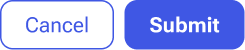
Actions that are most critical to advancing work are set to the right in the action area. Supporting actions appear to the left of the primary action.
Variations
Button variations communicate different actions or importance to the user.
- Primary buttons should be used only for the principal calls-to-action in a region. Typically only one primary button is visible at a time.
- Secondary buttons are the default button style.
- Simple buttons are reserved for actions related to a specific widget, inline interaction, or card. Simple buttons look stylistically like a link.
Content guidelines
While custom buttons are not configurable within the design system, some out-of-the-box buttons will allow for configuring parts of their label for better clartiy.
Button labels follow our writing guidelines – labelled either with a verb or verb then the object.