Checkboxes allow users to select or unselect a given option.
Usage
For best practices on building forms with inputs in the design system, visit the Forms page under Patterns.
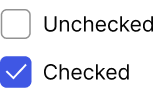
Variations
Checkbox
Use a single checkbox for binary selections, such as a decision or affirmation. A user may select and deselect the checkbox as many times as they like. Do not use the checkbox when a user MUST make an active decision, such as yes or no (use a radio group), or if you are expecting the changes to apply instantly (use a switch).
Display options
Required
This is useful when a user must select an option to progress further in the application, like when accepting Terms & Conditions.
Configuration
To learn how to configure this component in a Pega application, visit Pega Documentation.
All information on this site is for Pega’s UX design system, also known as Constellation (from 8.8 and onwards). If you have questions, concerns, or any other feedback, please reach out to us on Pega Forums where you can post on the User Experience Expert Circle.
Related components