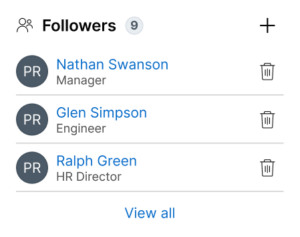
Followers is a utility widget that shows all of the people involved in a case. It is located in the Utilities panel of the Case Page.
Usage
The Followers widget content regions may scale to the height of the content or have a fixed height with scroll.
“View all” opens the full list of followers in a review modal and appears when there are 3 or more followers by default. The add button may be conditional based on the user’s role.
Anatomy
The card form of the Followers widget contains the following regions: heading, content region, card/tile actions (optional), “add new” option (conditional), header imagery, “view all” button (conditional), and a total results counter badge.
This component has only one main content column available.
The card and tile actions area may contain an expand collapse toggle, back button, or selectable UI imagery or cards.
The “View all” button only appears when the maximum number of results is exceeded.
Configuration
To learn how to configure this component in a Pega application, visit Pega Documentation.
All information on this site is for Pega’s UX design system, also known as Constellation (from 8.8 and onwards). If you have questions, concerns, or any other feedback, please reach out to us on Pega Forums where you can post on the User Experience Expert Circle.
Related components